For a portrait pickup meme video, the face, open window and send-off hand need to fit in the same readable frame. This guide explains how to plan a 9:16 Hit the Road Dude AI scene without letting the truck, scenery or camera movement crowd out the reaction.
Frame the driver before the vehicle
A pickup establishes the format, but the driver carries the joke. Describe a close or medium-close view from outside the open driver window. Keep the eyes, shoulders and the space where the hand will move visible. A broad landscape shot can make the vehicle look impressive while leaving the expression too small to read.
A three-quarter angle gives the face some shape and leaves room for the arm. Avoid simultaneously asking for a side profile, a front-facing close-up and a wide view of the whole truck. Choose the view that best explains the reaction.
Leave space for the hand and the final look
A tight crop can remove the gesture that delivers the punchline. Plan a little space beside the shoulder and above the window edge. Keep important details away from the outer edges when you later edit or add captions; preview the final export in the app where you intend to share it.
Do not rely on an exact universal safe area across social apps. Their controls and crops differ. Instead, keep the face and the main gesture near the useful center of your composition, then check the actual destination preview before publishing.
| What should read clearly | Useful direction |
|---|---|
| Expression | Keep both eyes and the mouth unobstructed. |
| Gesture | Leave room beside the shoulder and above the window. |
| Setting | Use one recognizable background detail. |
| Ending | Hold the last look without a new camera move. |
Separate the character reference from the location
Use a clear reference for the fictional character’s broad appearance, with even light and enough room around the head and shoulders. A portrait full of unrelated people or large background objects gives the scene competing signals. Keep the location reference in the separate custom-setting field.
The current uploader accepts JPG, PNG and WebP, up to 10 MB per selected image. Each side should be at least 300 pixels. The browser prepares a JPEG before upload. A larger file does not by itself make the expression more readable; a clean reference and balanced crop matter more to the plan.
Keep camera movement quieter than the reaction
A nearly steady handheld view can support the informal pickup-window exchange. A fast orbit, repeated zoom or sudden overhead view asks the model to solve a different visual problem. For a first attempt, describe subtle camera movement and one continuous shot.
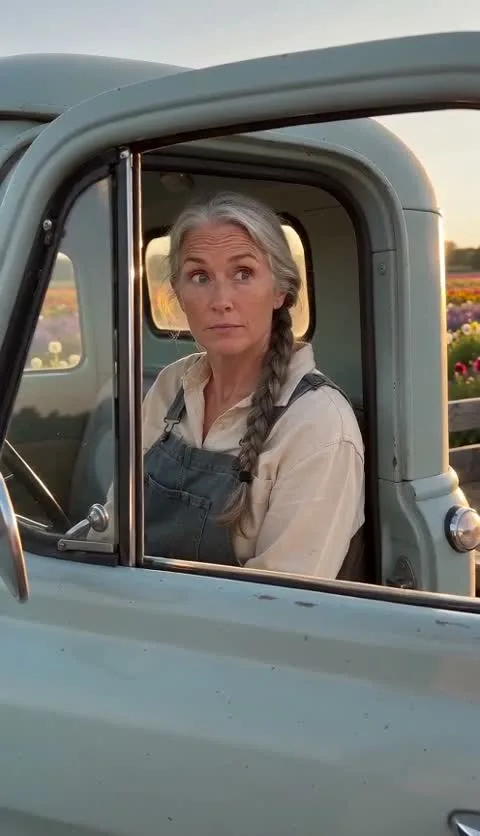
The flower-farm demonstration shows how a vehicle, one driver and a simple setting can share a vertical composition. It is a separately generated 10-second, 480p scene example, with the real prompt available on its watch page.
A framing direction to try
Keep the selected scene and add a short camera instruction. This is suggested direction for a new take, not an exact recreation of the demonstration.
Suggested creative direction
Use one continuous portrait shot from outside the open driver window, at a gentle three-quarter angle. Keep the fictional driver’s eyes, mouth, shoulders and one relaxed send-off gesture visible together. Use a quiet background and only subtle handheld movement. Hold the final expression instead of moving to a new angle.
Check the actual file, not only the cover
A poster is one frame. After the take is reviewed and released, play the full video and check whether the hand stays visible, the window remains coherent and the face is readable throughout. The standard quoted output is a 15-second, native 720p, 9:16 MP4 with generated sound; the lighter public examples use their own published settings.
Download the approved file before the expiry shown on the result. Make any final crop or caption choices from that file, then watch the edited version once more. Do not assume the portrait format guarantees a particular platform’s acceptance, reach or ranking.